A Parent’s Guide to Magic: The Gathering Arena
- An all-digital version of the wildly popular tabletop trading card game.
- Rated T for Teen (13+) due to Blood and Gore and Mild Fantasy Violence.
- If you play the physical card game, you’ll feel right at home in this arena (pun intended).
Magic: The Gathering has been delighting tabletop card game fans since 1993. The easy-to-learn but hard-to-master design, iconic characters and monsters from both its own universe and Universes Beyond, and legendary spells have been a mainstay of local game and hobby shops for over 30 years.
Magic: The Gathering Arena or MTG Arena is the digital counterpart, where players can enjoy building decks and battling against each other using the same cards as the tabletop versions, in the same or similar competitive formats. It’s the classic Magic: The Gathering experience, just on your phone or favorite gaming PC.
When a trip to the local game store isn’t in the cards, loading up MTG Arena to get some games in is a great alternative. However, as with any game dealing with collectible cards or other purchases, there are a few guidelines parents should know before letting their kids loose in the digital playground. Here, we’ll lay them out, so you can decide if MTG Arena is right for you and your family.
Is Magic: The Gathering Arena Appropriate for Kids?
MTG Arena is rated T for Teen (13+), with Content Descriptors for Blood and Gore and Mild Fantasy Violence, and Interactive Elements including In-Game Purchases, which indicates in-game offers to purchase digital goods or premium content with real-world currency.
The Blood and Gore content descriptor comes from still images on some of the playable cards in the game. According to the ESRB-assigned Rating Summary: “Some cards depict still images of violence and/or blood and gore: a vampire biting a victim’s neck, with a large bloodstain; a werewolf with bloody claws; zombie body parts; a figure pierced by several arrows; a severed head.”
There are no moving actions in card images, but the stills alone might be enough to unsettle younger players.
The Mild Fantasy Violence descriptor stems from the in-game sound effects whenever certain cards are played, or when a player’s turn moves to combat. These effects include shouts, the sounds of weapons clashing, and impacts from successful attacks.
MTG Arena is rated T for Teen (13+), with Content Descriptors for Blood and Gore and Mild Fantasy Violence.
As mentioned, MTG Arena does offer in-game purchases of digital currency, which can then be spent on packs of cards. These cards are added to the player’s inventory and used to build the decks used to play the game. Because in-game purchases are available, you might want to activate parental controls for spending limits before your child begins building decks, so a quest for a powerful Ouroboroid doesn’t become an expensive one.
Keep in mind that ESRB’s T for Teen rating applies to the content of the card game itself, not the difficulty. As such, if your child is younger than 13 but is already enjoying Magic: The Gathering at the local hobby shop with your permission, then there’s nothing in MTG Arena that they aren’t already experiencing with the physical card game. However, MTG Arena may be challenging for the uninitiated no matter the age!
Where Can I Play Magic: The Gathering Arena, and How Much Does It Cost?
MTG Arena is available on PCs and mobile devices, with both Android and iOS versions available. The game is free, but there are in-game purchases available to consider.
Those in-game purchases mostly involve unique in-game currency, which is then used to purchase card packs and entry into special “sealed” formats. The costs of each currency pack are clearly laid out in the app, as are the costs for packs and sealed entries using the in-game funds. In-game currency packs currently cost between $4.99 and $199.99.
As any game that’s highly dependent on individual cards to create powerful decks, MTG Arena can become a pricey endeavor. Make sure you set parental controls to block or limit spending on all of the devices used to play!
How Does Magic: The Gathering Arena Play?
MTG Arena plays exactly like Magic: The Gathering. So, let’s start there.
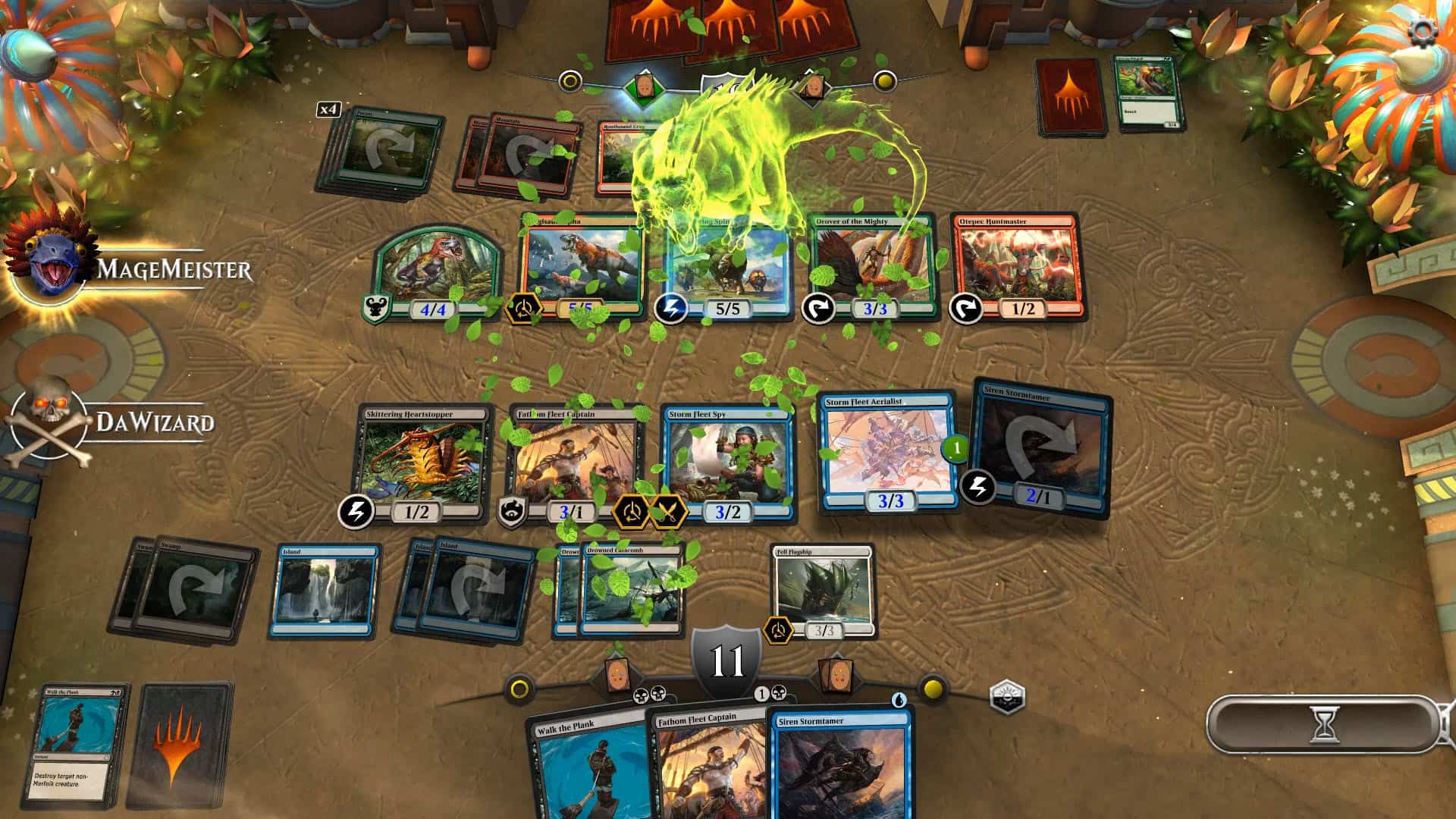
Magic: The Gathering Arena is a collectible card game where players build customized decks filled with cards that allow them to produce a resource called mana, cast spells, and summon creatures, with the goal of defeating their opponents in single-player and multiplayer matches. Producing mana, attacking, and activating certain abilities require “tapping” a card, turning it sideways to indicate it has been used. Tapped cards generally cannot act again until the player’s next turn. A game begins when each player draws seven cards. If a player doesn’t like the hand they’ve drawn, they can mulligan for a new hand, but they must place one of the new seven cards at the bottom of their deck.
Each turn follows a sequenced structure: Beginning Phase, Main Phase 1, Combat Phase, Main Phase 2, and End Phase.
In the Beginning Phase, a player “untaps” their cards, turning them back to their normal position, resolve any “upkeep effects” (abilities and/or costs that are triggered after untapping), and then draws a card.
Main Phases are where creatures can be summoned and spells can be cast, while the Combat Phase is where creatures attack or block and damage is dealt.
In-game currency packs currently cost between $4.99 and $199.99.
Cards included in each deck fall into one of several key categories, which include:
- Land: The main resource-producing cards.
- Creature: Cards that remain on the battlefield and can attack other players or defend their controller.
- Instant: One-off spells that can be cast at any time.
- Sorcery: One-off spells that can only be cast on the controller’s turn.
- Enchantment: Cards that remain on the battlefield and either provide a static effect or an activated ability.
- Artifact: Cards that act similarly to Enchantments that are typically colorless and more universally compatible with deck strategies.
Players can win a game in multiple ways, including the following:
- Reducing a player’s life total to 0 from its starting point of either 20 or 40, depending on the format.
- Forcing a player to draw more cards than their deck holds (in other words, force an opponent to run out of cards).
- Win conditions specified on individual cards.
- Example: The card Helix Pinnacle allows its controller to pay amount of mana to add that many counters to the card, and if Helix Pinnacle has more than 100 counters at the beginning of its controller’s turn, they immediately win.
In MTG Arena players can engage in one of three main categories of play: Draft, Sealed, and Constructed.
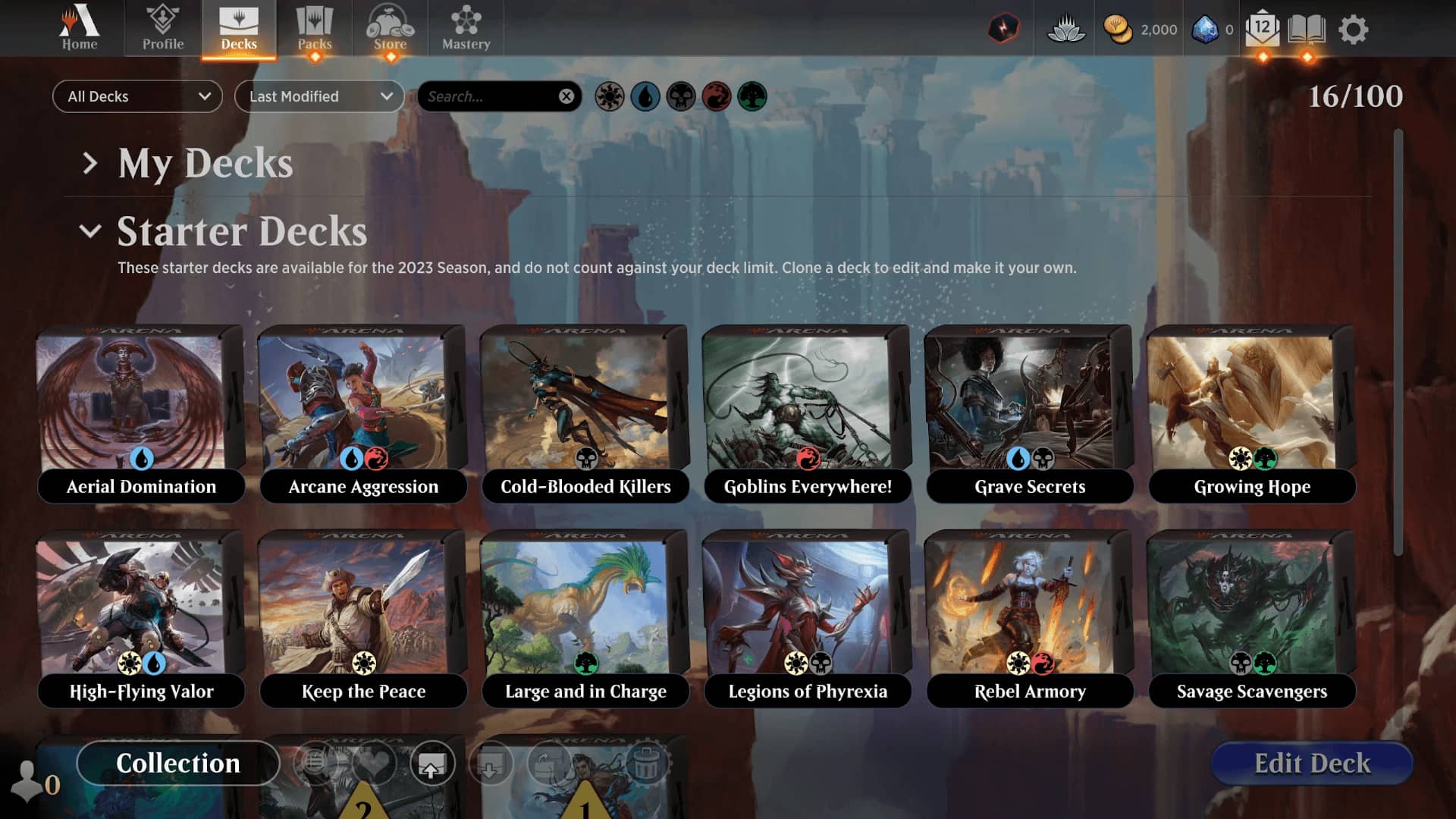
Draft games require a one-time entry fee of in-game currency, after which each player is provided with three packs. Each player opens one of their packs, chooses a card from that pack, and then passes the pack to another player. A card is then chosen from the passed pack, and this continues until all cards have been selected and all packs have been opened. Players then build 40-card decks from the cards they selected, and play begins until the player either wins seven games or loses three.
Sealed games also require a one-time entry fee, but instead of receiving three packs that are passed around, each player receives six packs that they keep to themselves. Once all of the packs are opened, the cards within act as a “pool” in which the player can build a 40-card deck. Once each player finishes their build, play begins until the player either wins seven games or lose three games.
Finally, Constructed formats see players build decks from their own collections and bring them into a match. Constructed matches follow a number of individual formats, including Standard, in which cards from a defined number of recent expansions are allowed; Alchemy, which features cards only found in the Arena app; Historic, which uses cards from Magic: The Gathering’s broader history; Pioneer, which features an expanded card pool from Standard; and Timeless, which allows for every card currently available in MTG Arena.
Also, while your kids will be matched up against other human players while playing MTG Arena, there are no default communication elements. A live chat does exist, but only for players who have linked up via friend request. Make sure you also set parental controls to manage with whom your kids can communicate if it’s something you’d like to keep track of.
How to Make Sure All of My Kids’ Video Game Experiences Stay Appropriate?
I like to think of checking the ESRB ratings as the Beginning Phase of picking appropriate games. It’s a great first step to get a bird’s-eye-view of what’s in a game. Sometimes that will be enough, and other times you may want to do some additional research for more information.
Fortunately, there are no shortages of sources when it comes to learning more about what’s in a game. You can read previews and reviews on game-enthusiast websites, check trailers, and even watch gameplay videos and walkthroughs online. Of course, the best way to learn everything about a game is to play it yourself! In the case of MTG Arena, it’s free to play. But many games have demos to try too.
Everyone’s kids are different, and to really know what the boundaries should be for yours the best thing you can do is ask! Talk with your kids about what they like and why in a non-judgmental way. Once they understand that you’re on their team and want them to have fun it’ll be a lot easier to land on (and explain) household rules around appropriate video games. For more on that, check out ESRB’s Family Gaming Guide.
Sometimes you need to back up your household rules, and parental controls are a great solution. Every device that can play games (including smartphones, tablets, and PCs) includes parental controls to manage what your kids can play, when and for how long, with whom (if anyone), and whether they can spend money on new games or, in the case of MTG Arena, in-game purchases. Parents also say that screen time is one of their biggest video game challenges. While MTG Arena matches can play out in as little as five minutes. Drafts and Sealed events take a little longer though, so if your child is asking to start a Draft 10 minutes before bedtime, you may want to save that Draft for another time and back it up with screen time controls. ESRB has step-by-step guides to help walk you through setting those controls at ParentalTools.org.
Related Articles
A Parent’s Guide to Star Wars: Galactic Racer
A Parent’s Guide to Minecraft Dungeons II